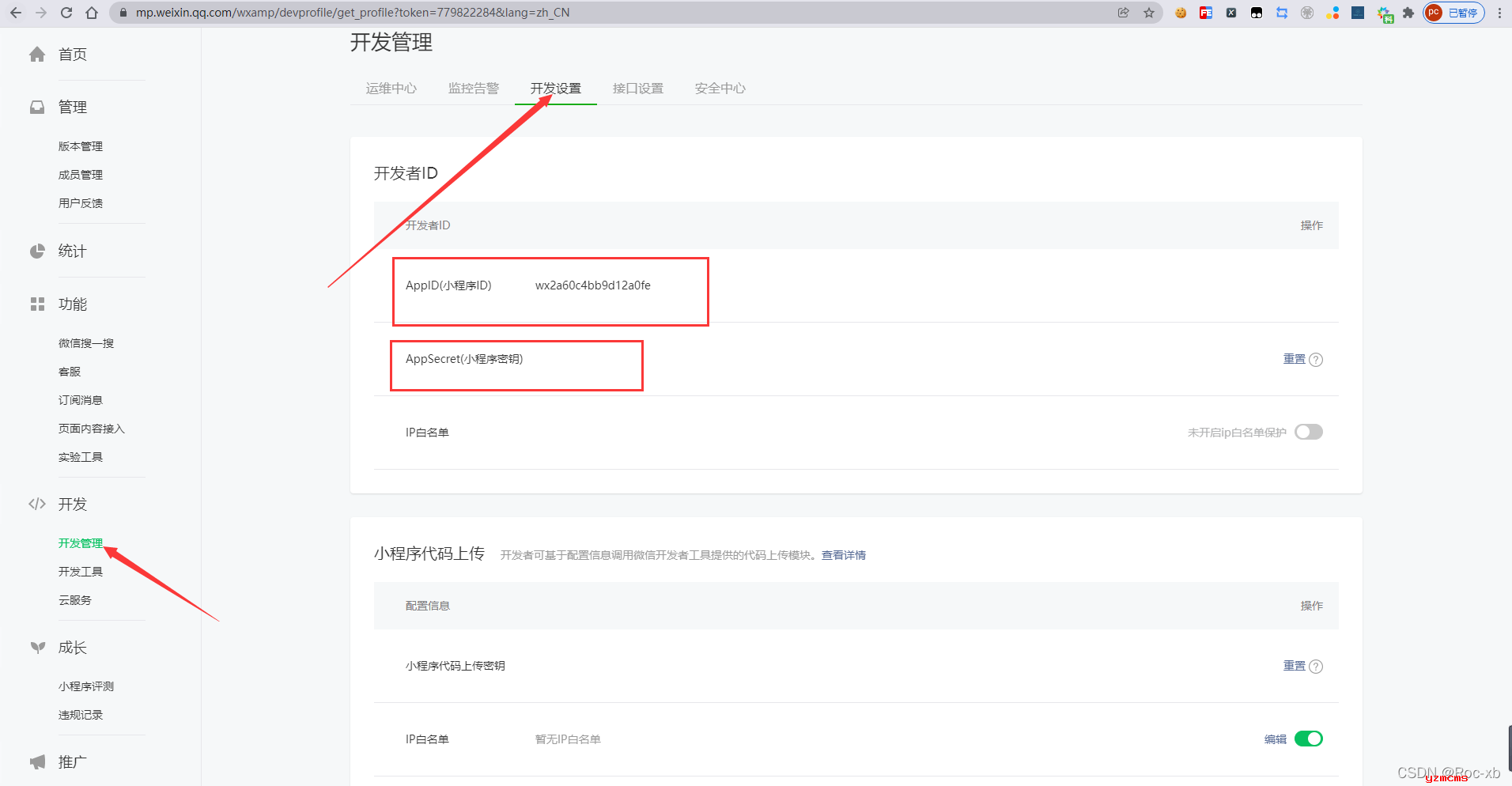
一、获取AppID和AppSecret
二、微信小程序授权登录流程
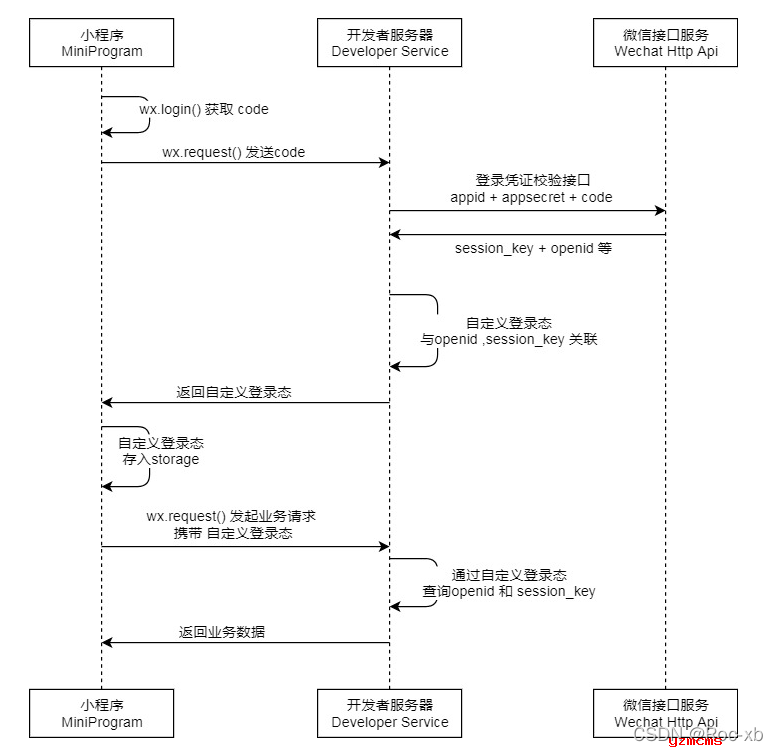
微信小程序登录流程图:
2.1 第一步:调用
wx.login()
 获取 临时登录凭证code ,并回传到开发者服务器。
wx.login({
  success (res) {
    if (res.code) {
      //发起网络请求
      wx.request({
        url: 'https://example.com/onLogin',
        data: {
          code: res.code
        }
      })
    } else {
      console.log('登录失败!' + res.errMsg)
    }
  }
})
2.2 第二步:调用
auth.code2Session
接口,换取 用户唯一标识 OpenID 、 用户在微信开放平台帐号下的唯一标识UnionID(若当前小程序已绑定到微信开放平台帐号) 和 会话密钥 session_key。
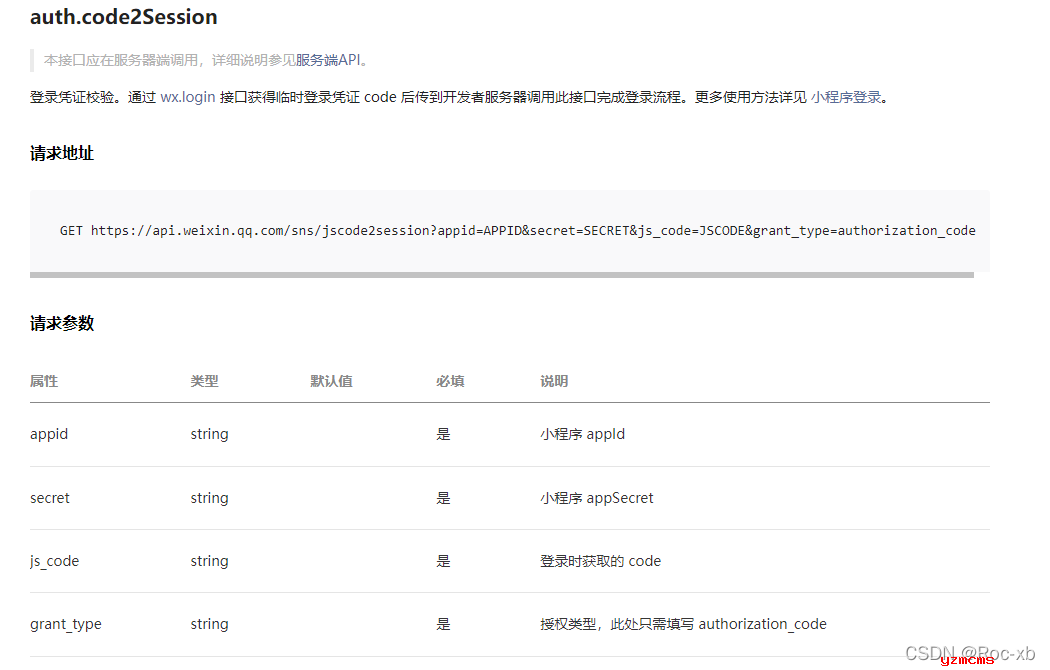
这里就需要我们为微信小程序写一个授权接口了,前端给我传入一个code参数,然后通过我们写的接口调用官方给我提供的授权接口,填写我们appid和secret及code参数。
三 后台接口编写
3.1 第一步: 需要的第三方依赖
    <dependencies>
        <!-- 通用工具-->
        <dependency>
            <groupId>com.ruoyi</groupId>
            <artifactId>ruoyi-common</artifactId>
        </dependency>

        <!--hutool工具类-->
        <dependency>
            <groupId>cn.hutool</groupId>
            <artifactId>hutool-all</artifactId>
            <version>5.7.19</version>
        </dependency>
    </dependencies>
3.2 第二步: JAVA接口代码
package com.ruoyi.wechat.controller;

import cn.hutool.core.util.StrUtil;
import cn.hutool.json.JSONObject;
import cn.hutool.json.JSONUtil;
import com.ruoyi.common.core.domain.AjaxResult;
import com.ruoyi.common.utils.http.HttpUtils;
import org.springframework.web.bind.annotation.GetMapping;
import org.springframework.web.bind.annotation.RequestMapping;
import org.springframework.web.bind.annotation.RestController;

import java.util.HashMap;
import java.util.Map;
import java.util.UUID;

/**
 * 微信小程序授权接口
 */
@RestController
@RequestMapping("/api")
public class WechatController {
    /**
     * 微信小程序AppID
     */
    private final static String AppID = "填写你的小程序AppID";
    /**
     * 微信小程序AppSecret
     */
    private final static String AppSecret = "填写你的小程序AppSecret ";

 /**
     * @param code 登录时获取的 code
     * @return
     */
    @GetMapping("/wxlogin")
    public AjaxResult getWechatLoginInfo(String code) {
        String url = "https://api.weixin.qq.com/sns/jscode2session";
        String params = StrUtil.format("appid={}&secret={}&js_code={}&grant_type=authorization_code", AppID, AppSecret, code);
        String json = HttpUtils.sendGet(url, params);
        JSONObject jsonObject = JSONUtil.parseObj(json);
        String session_key = (String) jsonObject.get("session_key");
        String openid = (String) jsonObject.get("openid");
        if (StrUtil.isEmpty(openid)) {
            return AjaxResult.error("未获取到openid");
        }
        String token = UUID.randomUUID().toString();
        Map<String, Object> data = new HashMap<>();
        data.put("token", token);
        data.put("session_key", session_key);
        data.put("openid", openid);
        return AjaxResult.success(data);
    }

}
四、编写小程序登陆界面
4.1 index.wxml
<!--index.wxml-->
<view class="container">
  <view>
    <button open-type="getUserInfo" bind:tap="login" type="default">微信授权登录</button>
  </view>
</view>
4.2 index.js
 login(evt) {
    wx.getUserProfile({
      desc: '登录', //描述信息
      success: res => {
        // console.log(res); 成功回调
        if (res.userInfo) {
          wx.login({
            success: ret => {
              // console.log(ret);
              var code = ret.code
              wx.request({
                url: 'http://localhost/api/wxlogin', //仅为示例,并非真实的接口地址
                data: {
                  code: code
                },
                success(res) {
                  console.log(res.data)
                  if (res.data.code == 0) {
                    console.log("登录成功");
                    wx.setStorageSync('token', res.data.data.token);
                    wx.setStorageSync('openid', res.data.data.openid);
                    wx.setStorageSync('session_key', res.data.data.session_key);
                    wx.navigateTo({
                      url: '/pages/hello/hello',
                    })
                  }else{
                    console.log("登录失败");
                  }
                }
              })
            }
          })
        }
      }
    })
  }
4.3 hello.wxml
<!--pages/hello/hello.wxml-->
<text>登录成功</text>
5. 其它
建议取消若以框架的验证码登陆(在springboot的配置中修改),用户表新增openid。结合若以框架的用户登陆接口,获取认证凭证,完成对接口认证操作。具体操作本站将另外文章详细说明,敬请期待。